Spring项目别再乱注入Service了!用Lambda封装个统一调用组件,直接起飞!
- 每个 Controller 里都要写 @Autowired UserService userService ,注入一大堆 Service,代码又乱又冗余;
- 想统一加个 日志/异常处理 ,得在每个 Service 方法里写一遍,改起来要疯;
- 偶尔还会手滑把 Service 类名/方法名 写错,编译不报错,跑起来才出问题,排查半天。
01组件能解决的实际问题
// 1. 先注入Service
@Autowired
private UserService userService;
// 2. 再调用方法
public SerResult<UserDTO> getUser(Long userId) {
    try {
        log.info("开始查用户,ID:{}", userId);
        UserDTO user = userService.queryUser(userId);
        log.info("查询成功,结果:{}", user);
        return SerResult.success(user);
    } catch (Exception e) {
        log.error("查询失败", e);
        return SerResult.fail("查用户出错了");
    }
}
public SerResult<UserDTO> getUser(Long userId) {
    // 一行搞定:传方法+参数,其他全帮你做
    return ServiceManager.call(UserService::queryUser, userId);
}
02组件核心逻辑:大白话拆解
-
你传个 Lambda(比如 UserService::queryUser ),它帮你找到对应的 Service 实例; -
把找到的实例和方法缓存起来,下次调用更快; -
统一执行方法,顺便把日志、异常处理都包了。
03先搭基础 — 需要的依赖和工具类
-
统一返回结果类(SerResult)
不管调用成功还是失败,都返回同一个格式,前端好处理:package org.pro.wwcx.ledger.common.dto; import lombok.Data; // 服务调用的统一返回结果,前端拿到就知道是成功还是失败 @Data publicclass SerResult<T> { privateint code; // 200=成功,500=失败,前端一看就懂 private String msg; // 提示信息,比如“操作成功”“查不到用户” private T data; // 成功时返回的数据,比如用户信息 // 成功的时候调用这个方法,把数据传进去 publicstatic <T> SerResult<T> success(T data) { SerResult<T> result = new SerResult<>(); result.setCode(200); result.setMsg("操作成功"); result.setData(data); return result; } // 失败的时候调用这个方法,传错误信息 publicstatic <T> SerResult<T> fail(String msg) { SerResult<T> result = new SerResult<>(); result.setCode(500); result.setMsg(msg); result.setData(null); return result; } } -
Lambda 解析工具(LambdaUtil)
这工具是核心,帮咱从 Lambda 里 “扣” 出 Service 类名和方法名(不用懂原理,复制用就行):package org.pro.wwcx.ledger.common.util; import java.io.Serializable; import java.lang.reflect.Method; import java.lang.invoke.SerializedLambda; // 从Lambda表达式里拿Service信息的工具 publicclass LambdaUtil { // 传个Lambda进来,返回它对应的“元数据”(比如哪个Service,哪个方法) public static SerializedLambda valueOf(Serializable lambda) { if (lambda == null) { thrownew IllegalArgumentException("Lambda不能传空!"); } try { // 反射拿到Lambda里的隐藏方法,不用管这行是咋回事 Method writeReplaceMethod = lambda.getClass().getDeclaredMethod("writeReplace"); writeReplaceMethod.setAccessible(true); return (SerializedLambda) writeReplaceMethod.invoke(lambda); } catch (Exception e) { thrownew RuntimeException("解析Lambda出错了", e); } } } -
Spring 工具类(SpringUtil)
帮咱从 Spring 里拿 Service 实例(不用手动 @Autowired 就是靠它):package org.pro.wwcx.ledger.common.util; import org.springframework.beans.BeansException; import org.springframework.context.ApplicationContext; import org.springframework.context.ApplicationContextAware; import org.springframework.stereotype.Component; // 从Spring里拿Bean的工具,不用自己注入Service @Component publicclass SpringUtil implements ApplicationContextAware { // Spring的上下文,相当于“Bean仓库” privatestatic ApplicationContext applicationContext; // 从仓库里按类型拿Bean,比如拿UserService类型的实例 publicstatic <T> T getBean(Class<T> requiredType) { if (applicationContext == null) { thrownew RuntimeException("Spring还没初始化好呢!"); } return applicationContext.getBean(requiredType); } // 下面这行是Spring自动调用的,不用管 @Override public void setApplicationContext(ApplicationContext applicationContext) throws BeansException { SpringUtil.applicationContext = applicationContext; } } -
函数接口(SerialBiFunction)
这个是 Lambda 的 “规矩”,规定传参和返回值的格式(复制就行):package org.pro.wwcx.ledger.common.resolver.anno; import java.io.Serializable; // 支持序列化的双参数函数接口,Lambda要符合这个格式 public interface SerialBiFunction<T, U, R> extends Serializable { // 方法格式:传入T(Service实例)和U(参数),返回R(结果) R apply(T t, U u); } -
实例构建器(InstBuilder)
package org.pro.wwcx.ledger.common.resolver;
// 快速创建对象的工具,比如new ServiceExecutor后不用一个个set值
public class InstBuilder<T> {
    privatefinal T target;
    // 初始化要创建的对象
    private InstBuilder(Class<T> clazz) {
        try {
            this.target = clazz.getDeclaredConstructor().newInstance();
        } catch (Exception e) {
            thrownew RuntimeException("创建对象失败", e);
        }
    }
    // 静态方法,入口:InstBuilder.of(ServiceExecutor.class)
    public static <T> InstBuilder<T> of(Class<T> clazz) {
        returnnew InstBuilder<>(clazz);
    }
    // 链式set值:比如.set(ServiceExecutor::setParam, param)
    public <V> InstBuilder<T> set(Setter<T, V> setter, V value) {
        setter.set(target, value);
        returnthis;
    }
    // 最后调用build()拿到对象
    public T build() {
        return target;
    }
    // 定义setter的格式
    @FunctionalInterface
    public interface Setter<T, V> {
        void set(T target, V value);
    }
}
04核心组件 — ServiceManager
package org.pro.wwcx.ledger.common.servicer;
import lombok.extern.slf4j.Slf4j;
import org.pro.wwcx.ledger.common.dto.SerResult;
import org.pro.wwcx.ledger.common.resolver.InstBuilder;
import org.pro.wwcx.ledger.common.resolver.anno.SerialBiFunction;
import org.pro.wwcx.ledger.common.util.LambdaUtil;
import org.pro.wwcx.ledger.common.util.SpringUtil;
import java.lang.invoke.SerializedLambda;
import java.util.Map;
import java.util.concurrent.ConcurrentHashMap;
// 日志注解,能打日志
@Slf4j
public class ServiceManager {
    // 缓存初始化大小,6666够咱用了,不够再改
    privatestaticfinalint INIT_COUNT = 6666;
    // 缓存Lambda对应的Service信息,key是Lambda,value是Service元数据
    privatestaticfinal Map<SerialBiFunction<?,?,?>, LambdaMeta<?>> CACHE_LAMBDA;
    // 静态代码块,项目启动时就初始化缓存
    static {
        CACHE_LAMBDA = new ConcurrentHashMap<>(INIT_COUNT);
    }
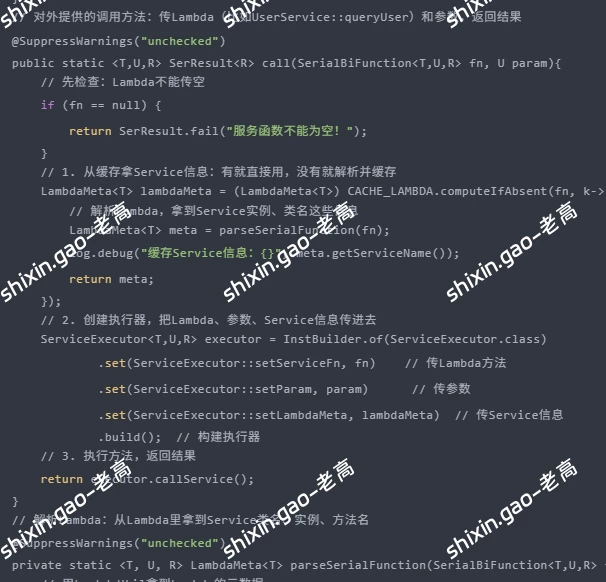
    // 对外提供的调用方法:传Lambda(比如UserService::queryUser)和参数,返回结果
    @SuppressWarnings("unchecked")
    public static <T,U,R> SerResult<R> call(SerialBiFunction<T,U,R> fn, U param){
        // 先检查:Lambda不能传空
        if (fn == null) {
            return SerResult.fail("服务函数不能为空!");
        }
        // 1. 从缓存拿Service信息:有就直接用,没有就解析并缓存
        LambdaMeta<T> lambdaMeta = (LambdaMeta<T>) CACHE_LAMBDA.computeIfAbsent(fn, k-> {
            // 解析Lambda,拿到Service实例、类名这些信息
            LambdaMeta<T> meta = parseSerialFunction(fn);
            log.debug("缓存Service信息:{}", meta.getServiceName());
            return meta;
        });
        // 2. 创建执行器,把Lambda、参数、Service信息传进去
        ServiceExecutor<T,U,R> executor = InstBuilder.of(ServiceExecutor.class)
                .set(ServiceExecutor::setServiceFn, fn)    // 传Lambda方法
                .set(ServiceExecutor::setParam, param)      // 传参数
                .set(ServiceExecutor::setLambdaMeta, lambdaMeta)  // 传Service信息
                .build();  // 构建执行器
        // 3. 执行方法,返回结果
        return executor.callService();
    }
    // 解析Lambda:从Lambda里拿到Service类名、实例、方法名
    @SuppressWarnings("unchecked")
    private static <T, U, R> LambdaMeta<T> parseSerialFunction(SerialBiFunction<T,U,R> fn) {
        // 用LambdaUtil拿到Lambda的元数据
        SerializedLambda lambda = LambdaUtil.valueOf(fn);
        // 封装Service信息的对象
        LambdaMeta<T> lambdaMeta = new LambdaMeta<>();
        // 1. 解析Service类名:Lambda里的类名是“com/example/UserService”,要改成“com.example.UserService”
        String tClassName = lambda.getImplClass().replaceAll("/", ".");
        try {
            // 2. 拿到Service的Class对象(比如UserService.class)
            Class<T> aClass = (Class<T>) Class.forName(tClassName);
            // 3. 从Spring里拿Service实例(不用@Autowired就是靠这行)
            T inst = SpringUtil.getBean(aClass);
            // 4. 把信息存到lambdaMeta里
            lambdaMeta.setClazz(aClass);    // 存Service的Class
            lambdaMeta.setInst(inst);       // 存Service实例
            lambdaMeta.setServiceName(lambda.getImplMethodName());  // 存方法名(比如queryUser)
        } catch (ClassNotFoundException e) {
            // 找不到类就抛异常
            thrownew RuntimeException("没找到Service类:" + tClassName, e);
        }
        return lambdaMeta;
    }
    // 封装Service信息的内部类:存Class、实例、方法名
    @lombok.Data
    private staticclass LambdaMeta<T> {
        private Class<T> clazz;          // Service的Class(比如UserService.class)
        private T inst;                  // Service实例(Spring里的Bean)
        private String serviceName;      // 方法名(比如queryUser)
    }
}
05执行器 — ServiceExecutor
package org.pro.wwcx.ledger.common.servicer;
import lombok.Setter;
import lombok.extern.slf4j.Slf4j;
import org.pro.wwcx.ledger.common.dto.SerResult;
import org.pro.wwcx.ledger.common.resolver.anno.SerialBiFunction;
// 执行Service方法的类,统一打日志、处理异常
@Slf4j
@Setter
publicclass ServiceExecutor<T, U, R> {
    private SerialBiFunction<T, U, R> serviceFn;  // 要执行的Lambda方法
    private U param;                               // 方法参数
    private ServiceManager.LambdaMeta<T> lambdaMeta;  // Service信息
    // 执行方法的核心逻辑
    public SerResult<R> callService() {
        // 记录开始时间,方便算耗时
        long startTime = System.currentTimeMillis();
        String serviceName = lambdaMeta.getClazz().getSimpleName();  // 比如UserService
        String methodName = lambdaMeta.getServiceName();             // 比如queryUser
        log.info("开始调用:{}的{}方法,参数:{}", serviceName, methodName, param);
        try {
            // 真正执行方法:用Service实例调用Lambda方法
            R result = serviceFn.apply(lambdaMeta.getInst(), param);
            // 算耗时,打成功日志
            long costTime = System.currentTimeMillis() - startTime;
            log.info("调用成功:{}的{}方法,耗时{}ms,结果:{}",
                    serviceName, methodName, costTime, result);
            // 返回成功结果
            return SerResult.success(result);
        } catch (Exception e) {
            // 出错了就打错误日志,返回失败结果
            long costTime = System.currentTimeMillis() - startTime;
            log.error("调用失败:{}的{}方法,耗时{}ms",
                    serviceName, methodName, costTime, e);
            return SerResult.fail("调用" + serviceName + "的" + methodName + "方法失败:" + e.getMessage());
        }
    }
}
06怎么用?举个实际例子
-
先写个 Service(正常写,不用改) package org.pro.wwcx.ledger.service; import org.pro.wwcx.ledger.dto.UserDTO; import org.pro.wwcx.ledger.dto.UserUpdateDTO; import org.springframework.stereotype.Service; // 正常的Service,该咋写咋写 @Service publicclass UserService { // 查用户:根据ID查 public UserDTO queryUser(Long userId) { // 这里模拟查数据库,实际项目里换JDBC/MyBatis UserDTO user = new UserDTO(); user.setUserId(userId); user.setUserName("张三"); user.setAge(25); return user; } // 更新用户:传ID和更新参数 public Boolean updateUser(Long userId, UserUpdateDTO updateDTO) { // 这里模拟更新数据库 log.info("更新用户{}的信息:{}", userId, updateDTO); returntrue; // 返回更新成功 } } -
Controller 里调用(重点看变化) package org.pro.wwcx.ledger.controller; import org.pro.wwcx.ledger.common.dto.SerResult; import org.pro.wwcx.ledger.common.servicer.ServiceManager; import org.pro.wwcx.ledger.dto.UserDTO; import org.pro.wwcx.ledger.dto.UserUpdateDTO; import org.pro.wwcx.ledger.service.UserService; import org.springframework.web.bind.annotation.*; @RestController @RequestMapping("/user") publicclass UserController { // 查用户:不用注入UserService!一行搞定 @GetMapping("/{userId}") public SerResult<UserDTO> getUser(@PathVariable Long userId) { // 直接传Lambda(UserService::queryUser)和参数(userId) return ServiceManager.call(UserService::queryUser, userId); } // 更新用户:同样不用注入 @PutMapping("/{userId}") public SerResult<Boolean> updateUser( @PathVariable Long userId, @RequestBody UserUpdateDTO updateDTO) { // 这里要注意:因为updateUser有两个参数,所以要显式指定Lambda类型 return ServiceManager.call( (UserService service, UserUpdateDTO dto) -> service.updateUser(userId, dto), updateDTO ); } } -
跑起来看看效果
开始调用:UserService的queryUser方法,参数:1001
调用成功:UserService的queryUser方法,耗时5ms,结果:UserDTO(userId=1001, userName=张三, age=25)
{
  "code": 500,
  "msg": "调用UserService的queryUser方法失败:用户不存在",
  "data": null
}
07这组件的好处:总结一下
-
不用再写 @Autowired: Controller 里干干净净,再也不用注入一堆 Service;
-
统一日志 / 异常: 想改日志格式、加权限校验,只需要改 ServiceExecutor ,不用改每个方法;
-
缓存优化: 解析过的 Service 信息会缓存,下次调用更快;
-
类型安全: 写 Lambda 的时候,方法名错了编译就报错,不用等到运行才发现。
08注意事项:避坑指南
-
JDK 版本: 用 JDK8 及以上,Lambda 表达式是 JDK8 才有的;
-
Service 要加 @Service: Spring 才能扫描到,不然 SpringUtil 拿不到实例;
-
多实现类的情况: 如果一个接口有多个实现(比如 UserService 有 UserServiceImpl1 和 UserServiceImpl2 ),需要在 SpringUtil 里加按名称拿 Bean 的方法。
版权声明:
作者:shixingao
链接:https://www.xincraft.cn/406.html
文章版权归作者所有,未经允许请勿转载。
THE END